Industry-Specific Automation Software Solutions for Smarter Operations
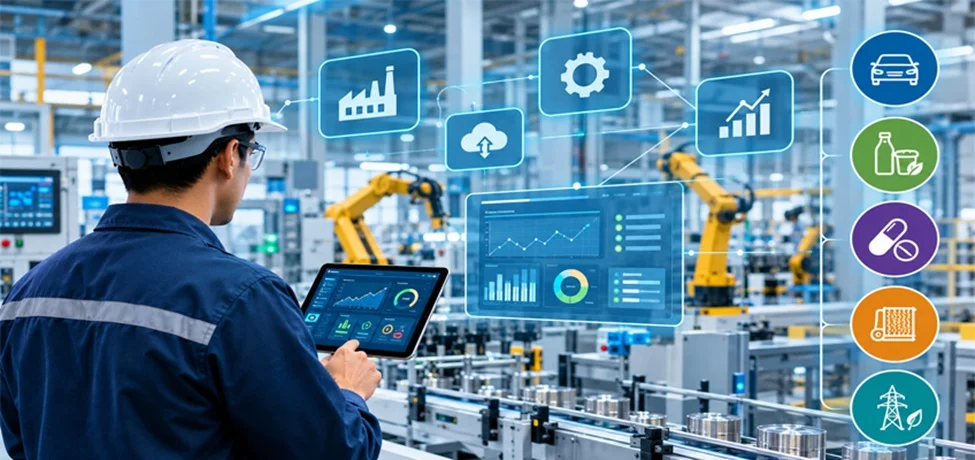
Most plants don’t have a technology problem. They have a connection problem.
The machines run. The people work hard. Yet at 6 a.m., a breakdown from the night shift is still sitting in a half-filled spreadsheet, and two departments are arguing over who caused a late order. The tools are all there. They just don’t talk to each other.
That gap is why industrial automation software is no longer a nice-to-have. It is the difference between a plant that reacts to problems and one that sees them coming.
What Is Industry-Specific Automation Software?
Industry-specific automation software is software built around the workflows, compliance rules, and equipment of one particular sector, such as automotive, food and beverage, pharma, textiles, or energy. Instead of forcing your team to bend a generic platform to fit, it ships with the logic, templates, and integrations your industry already needs.
Think of it like the difference between a general toolkit and a surgeon’s instrument set. Both are useful, but only one is designed for the job in front of you.
Why Generic Tools Fall Short
Many companies start with an all-purpose system and slowly discover its limits:
- Heavy customization is needed before it’s usable
- Compliance and traceability are bolted on instead of built in
- Operators find the interface confusing because it doesn’t match their real tasks
- Integration with industry-standard machines and sensors becomes a long project
Industry-specific platforms avoid most of this because they begin with your sector’s reality, not a blank canvas.
Key Types of Industrial Automation Software
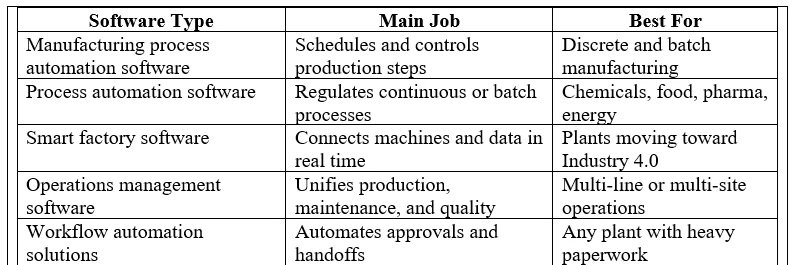
“Automation software” is a big umbrella. Here’s how the main categories fit together.
1. Manufacturing Software
Manufacturing software covers the systems that plan, schedule, and track production, from MES (Manufacturing Execution Systems) to production planning and quality management tools. It answers questions like: What are we making today? On which line? Is it meeting spec?
2. Process Automation Software
Process automation software controls and monitors continuous or batch processes, such as mixing, heating, filling, and refining. It keeps variables like temperature, pressure, and flow within tight limits without constant manual adjustment.
3. Smart Factory Software
Smart factory software connects machines, sensors, and people through IoT and real-time analytics. It’s what lets a line adjust itself, flag a failing bearing before it breaks, or show leadership live performance data from anywhere.
4. Industrial Operations Management Software
Industrial operations management software is the layer that ties it all together. It brings production, maintenance, inventory, quality, and safety into one view so decisions are made on shared, current information rather than yesterday’s spreadsheet.
5. Industrial Workflow Automation Solutions
Industrial workflow automation solutions handle the handoffs: approvals, work orders, maintenance requests, quality inspections, and change notices. Instead of chasing signatures or emailing PDFs, tasks move automatically to the right person at the right time.
How They Compare at a Glance
How Does Industrial Automation Software Improve Operational Efficiency?
Industrial automation software for operational efficiency works in four main ways: it removes repetitive manual work, reduces human error, gives real-time visibility into production, and speeds up decisions. Here’s what that looks like in practice.
Less downtime. Predictive maintenance features watch equipment behavior and alert teams before a failure. Planned repairs cost far less than emergency stops.
Fewer errors. When data flows automatically from machine to system, nobody retypes numbers. Quality checks happen at the point of production rather than after the batch is already finished.
Faster response. Dashboards show what’s happening now. A supervisor sees a slowdown in minutes, not at the end of the shift.
Better use of people. Operators spend less time on logging and reporting and more time on problem-solving, which is the work humans do best.
Easier compliance. In regulated industries, automatic record-keeping and audit trails take a lot of pressure off the team.
Real-World Examples by Industry
Seeing how this plays out helps make it concrete.
- Automotive: Line-balancing and traceability tools track every component to the vehicle it ends up in, which is invaluable during recalls.
- Food and beverage: Batch control and temperature monitoring protect safety and consistency while making allergen and lot tracking simpler.
- Pharmaceuticals: Electronic batch records and validation-ready workflows support strict regulatory requirements.
- Textiles: Automated scheduling and quality inspection reduce waste on short, varied production runs.
- Energy and utilities: Remote monitoring and alarm management keep distributed assets running safely.
The pattern is the same in each. The software understands the sector’s specific risks and routines, so less has to be built from scratch.
What Should You Look for When Choosing a Solution?
Buying software is easy. Buying the right software takes a little more care. Use this checklist:
1. Industry fit. Does it include templates, compliance features, and terminology from your sector?
2. Integration. Can it connect to your existing PLCs, SCADA, ERP, and sensors without a massive rebuild?
3. Scalability. Will it still work when you add a line, a shift, or another plant?
4. Ease of use. If operators find it frustrating, they’ll work around it. Ask to see the shop-floor interface, not just the manager dashboard.
5. Data and analytics. Can you actually act on the insights, or is it just pretty charts?
6. Security. Industrial systems are increasingly targeted, so look for role-based access, encryption, and update support.
7. Vendor support. Training, onboarding, and responsive help matter as much as features.
How to Get Started Without Overwhelm
You don’t need to automate everything at once. A sensible path looks like this:
- Map your pain points. Where do delays, rework, or paperwork pile up?
- Pick one high-impact area. Maintenance scheduling or quality tracking is often a good first win.
- Run a pilot. Test on one line or one department and measure results.
- Involve the floor early. Operators know where the real problems are, and they’ll adopt tools they helped shape.
- Expand in stages. Add modules as the team gains confidence.
Small, visible wins build trust, and trust is what makes larger rollouts succeed.
Common Mistakes to Avoid
- Buying on features alone. A long feature list means little if it doesn’t match your workflow.
- Ignoring change management. Technology fails when people aren’t prepared for it.
- Skipping data cleanup. Automating messy data just produces messy results faster.
- Treating it as a one-time project. Good operations software evolves with your business.
Frequently Asked Questions
What is industrial automation software?
Industrial automation software is a set of digital tools that monitor, control, and optimize production and operational processes with minimal manual input. It includes systems for scheduling, process control, quality management, maintenance, and data analytics.
What’s the difference between manufacturing software and process automation software?
Manufacturing software focuses on planning and tracking production, such as orders, schedules, and quality. Process automation software focuses on controlling the physical process itself, such as temperatures, flows, and batch sequences. Many plants use both together.
What is smart factory software?
Smart factory software connects machines, sensors, and systems through IoT and analytics so a plant can monitor itself in real time, predict problems, and adjust operations automatically.
Why choose industry-specific software over a general platform?
Industry-specific software comes with built-in compliance features, relevant workflows, and the right integrations for your sector, which usually means faster setup, less customization, and fewer surprises.
Is automation software only for large manufacturers?
No. Many modern solutions are modular and cloud-based, so small and mid-sized businesses can start with one function and scale over time.
How long does implementation take?
It depends on scope. A focused pilot can go live in weeks, while a full multi-site rollout takes longer. Starting small is the safest approach.
The Bottom Line
Smarter operations don’t come from working harder. They come from removing the friction that slows good people down. Industry-specific automation software gives your team tools that already understand your sector, so you spend less time wrestling with systems and more time improving how you make things.
Start with one problem, choose a solution that fits your industry, and build from there.
 Our Services
 Media Pack Download
 Newsletters
 Industrial Events